SimpleKeyClicker
SimpleKeyClicker is a lightweight GUI-based tool to automate pressing keys and mouse clicks at specified intervals. Ideal for repetitive tasks such as in certain games or applications, it allows you to queue up a sequence of keys or mouse actions and run them continuously until stopped.
SimpleKeyClicker

A powerful and user-friendly GUI automation tool for simulating keyboard and mouse inputs. Built with Python and CustomTkinter for a stunning modern dark UI. Perfect for gaming macros, testing, or automating repetitive input tasks.
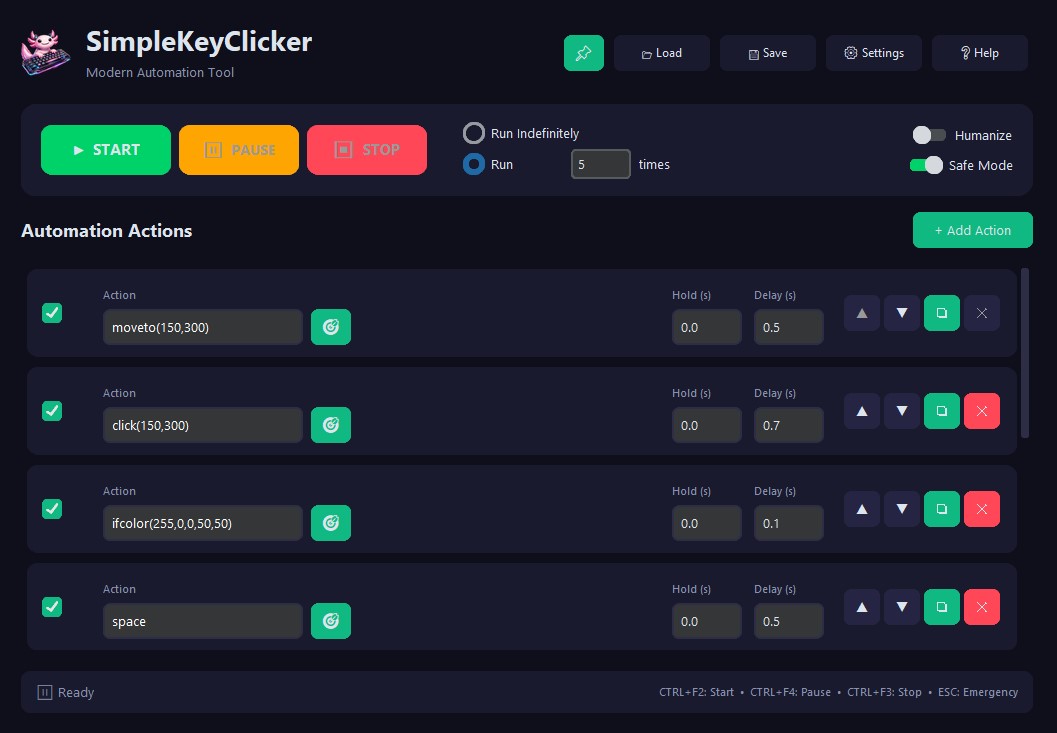
Key Features
Input that registers in games
- Actions are sent via PyDirectInput (SendInput / scancodes), so clicks, moves and drags work inside games.
- Clicks, moves and drags at specific screen coordinates.
- Humanize: optional curved, eased, jittered mouse paths.
Sequences
- Build a list of actions and run it top to bottom.
- Times: repeat a single row N times before moving to the next one.
repeat(N)…endrepeatblocks (nestable) to repeat a group of rows.ifcolor/ifnotcolorconditionals.- Enable or disable any row without deleting it.
Timing
- Hold durations and delays after each action, including random ranges (
0.3-0.8). - Run the sequence indefinitely or a set number of times.
- Configurable color-wait timeout — including wait forever.
Color
- Capture mouse coordinates (X,Y) and pixel color (R,G,B) with a single click.
waitcolorblocks until a color appears;ifcolor/ifnotcolorbranch on it.
While it runs
- Live loop/action counters, elapsed time, CPS, and an ETA + progress bar for limited runs.
- Pause mid-sequence and resume from the same step.
- Global hotkeys: Start (
Ctrl+F2), Pause (Ctrl+F4), Stop (Ctrl+F3), Emergency Stop (ESC) — all customizable.
Everyday comfort
- Sleek dark UI with 7 selectable accent colors and an always-on-top pin.
- Save/Load sequences to JSON; your last session auto-restores on launch.
- Invalid timing/action fields are flagged before you run.
- Toggleable Safe Mode and customizable Emergency Stop.
Download
Get the latest release directly from the GitHub Releases Page.
(Look for the .exe file for Windows)
Quick Start
- Download and run the
.exefile from the latest release. - Click “Add Row” to create steps for your sequence.
- For each row:
- Enter a Key/Button or command (see Help > Show Keys/Actions Info in the app).
- Use “Capture” to easily get coordinates/colors for commands like
moveto,click(x,y),waitcolor. - Set the Hold Time, Delay and Times (how often the row repeats before the next one; default
1).
- Use the ▲, ▼, ❏, X buttons on each row to organize your sequence.
- Select the desired Run Mode: “Run Indefinitely” or “Run X Times”.
- (Optional) Click 💾 Save to export your sequence (your session also auto-restores on next launch).
- Click “Start” or press
Ctrl+F2. - Pause/resume with
Ctrl+F4; Stop withCtrl+F3(orESCfor emergency stop).
Waiting for a Color
waitcolor(r,g,b,x,y) blocks the sequence until that color appears at those coordinates. By default it gives up after 30 seconds and stops the run.
If you are waiting for something that may take hours — a popup, a queue, a respawn — open Settings → Color wait and set it to 0. The sequence then waits as long as it takes. A single action can override the setting with a sixth value: waitcolor(r,g,b,x,y,600) for ten minutes, waitcolor(r,g,b,x,y,0) for forever.
While it waits, Stop (Ctrl+F3) and Emergency Stop (ESC) still work — an endless wait is always interruptible.
Building from Source (Optional)
- Ensure Python 3.7+ is installed.
- Clone the repository:
git clone https://github.com/timoinglin/SimpleKeyClicker.git - Navigate to the directory:
cd SimpleKeyClicker - Create and activate a virtual environment (recommended):
python -m venv venv # On Windows: venv\Scripts\activate # On macOS/Linux: source venv/bin/activate - Install dependencies:
pip install -r requirements.txt - Run the application:
python main.py
Repository
Find the full source code and contribute on GitHub.